

Connect an AI Assistant to Your Journal (MCP)
Your journal, in the AI you already use. Through the Model Context Protocol (MCP), your assistant can read and search your journal to answer questions about your own life — no copy-pasting. Read-only, and part of Pro.
Benefits
Works with your AI tools
Add Pensio to Claude, ChatGPT, Cursor or Visual Studio Code with one address. A Claude connection also works in Claude Code and Claude Desktop, with no token to copy. Your journal becomes a source your assistant can actually read.
Read-only by design
A connected assistant can read and search — it can never create, edit, or delete your entries. Read-only is enforced on our servers, not just promised.
Answers from your real history
It uses 20 of the intelligence functions that power Explore. Ask "who do I mention most, and how do I feel about each?" and get a ranked, emotion-scored answer in a single call.
Yours to limit, and to stop
Every connection is one you approved, with a reading limit you chose, and it stops from Settings on its next request. What it reads goes to the assistant's company under its terms, so you choose how much.
Works with
- Claude Tested Paste one address, then approve it on Pensio
- Claude Code Tested Through your Claude connection, with no token
- Claude Desktop From their docs Through your Claude connection, with no token
- ChatGPT From their docs Paste one address; steps from its maker's documentation — it needs Plus or above, with Developer Mode on
- Cursor Tested Paste one address, then approve it on Pensio
- Visual Studio Code Tested Paste one address, then approve it on Pensio
Claude, Claude Code, Claude Desktop, ChatGPT, Cursor and Visual Studio Code are trademarks of their respective owners. Pensio is not affiliated with or endorsed by them.
What you could ask
- “Was I calmer in June than in March?”
- “What do I write about when I write about my sister?”
- “Find the week I decided to leave that job.”
You choose how much it reads
- Totals and trends only It can tell you that March was your hardest month and who came up most often. It cannot quote a word of what you wrote, and it cannot tell you what it makes of any one person.
- Short excerpts from entries It can quote the opening of an entry when it answers you — enough to show you where something came from, not the whole page.
- Full entry text It can read entries end to end. Choose this only for an assistant you would be comfortable handing the notebook to.
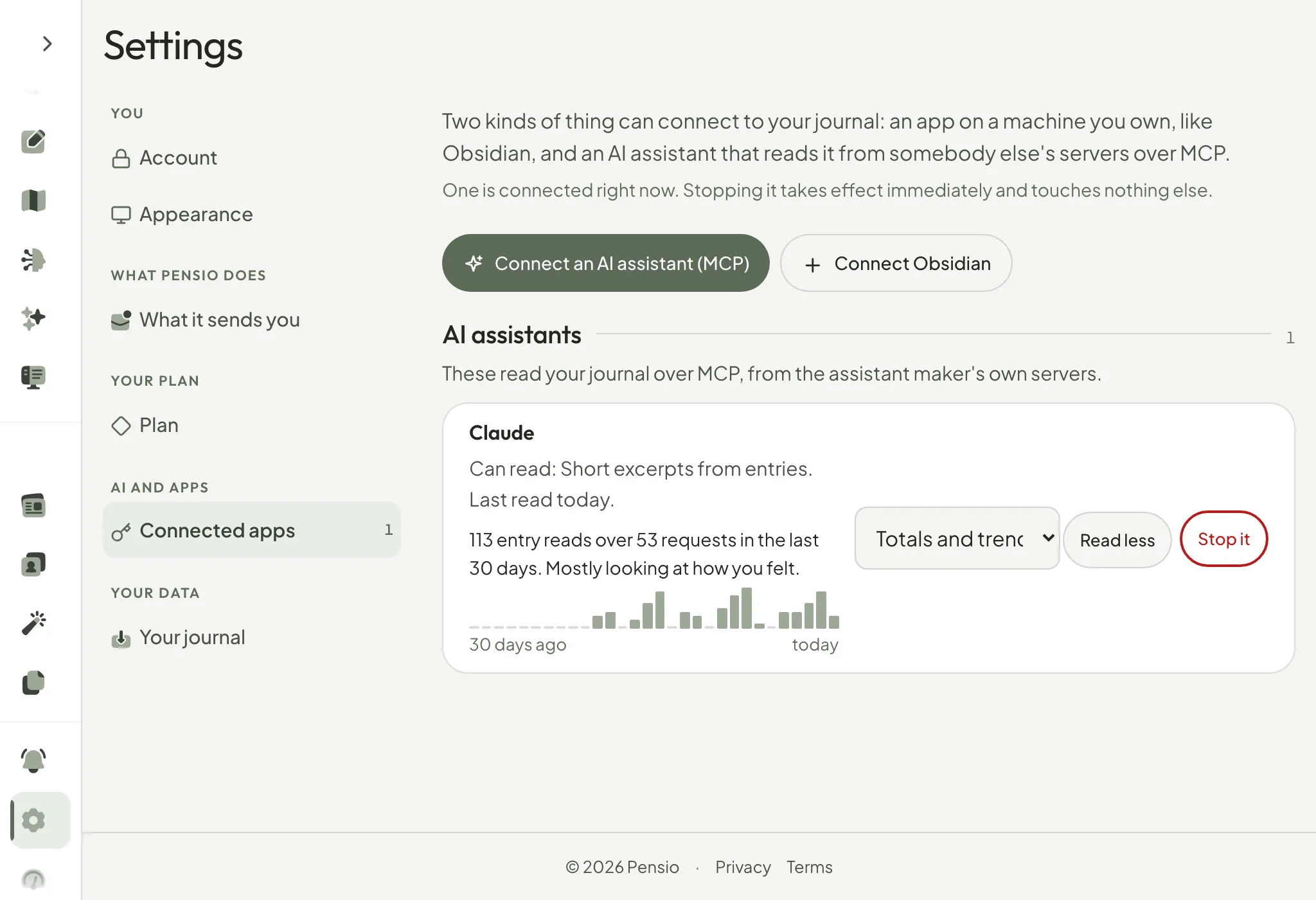
You see it, and you can stop it
Connect an AI assistant (MCP)
Your journal, in the AI you already use, like Claude, ChatGPT, Cursor or Visual Studio Code — read-only
You can ask the assistant you already use about your own journal, without pasting your journal into it. It can look things up. It can never write anything down.
An example
“Have I been sleeping badly the weeks I see my father?”
- It read 6 entries
- It could not change any of them
It searches your entries, finds the six that mention him, and answers from what you actually wrote — in a chat where you never pasted a single line of it.
What you can do
- Choose how much it may read
- You pick one of the three above when you connect it. It applies to every answer, not just the first.
- See how much it has read
- How many entries it was given in the last 30 days, and on which days. A sudden spike is the thing to look for.
- Stop it
- From Settings, or from the link in the email — that one works without signing in, in case the session it was connected from was not yours.
- Connect more than one
- Each keeps its own limit and its own history. Stopping one leaves the others alone.
How It Works
Copy the address
Connecting an AI assistant is a Pensio Pro feature. Open Settings → Connected apps → Connect an AI assistant: it shows one address, ending in /mcp, with a Copy button.
Add it in your assistant
The page has each assistant's own steps. In Claude, open Settings → Connectors → Add custom connector, paste the address, and let it register itself.
Approve it on Pensio
Your assistant opens a Pensio screen that names it and asks how much it may read: totals only, short excerpts, or full entries. Nothing is shared until you press Connect it.
Ask your journal anything
Your assistant can now read and search your entries to answer questions grounded in your own words — "what have I been feeling this month?", "what did I write about this project?", and more.
Use Cases
MCP turns your journal into something your AI assistant can actually read. Here are common ways people use it.
Talk to your journal from your desktop
While you work in Claude, ChatGPT, Cursor or Visual Studio Code, ask "what did I write about this project last month?" without leaving the tools you already live in.
A weekly self-review with your AI
Ask your assistant to summarize how you have been feeling this month and which themes keep coming up — answered from your real entries, not guesswork.
People and relationships
Ask "who do I mention most, and how do I feel about each?" and get a ranked, emotion-scored answer drawn from months of entries — in a single call.
Let it see the totals only
Choose totals and trends only, and your assistant can tell you which month was hardest and who came up most often, without quoting a word you wrote. You can narrow a connection later from Settings without reconnecting.